 -by
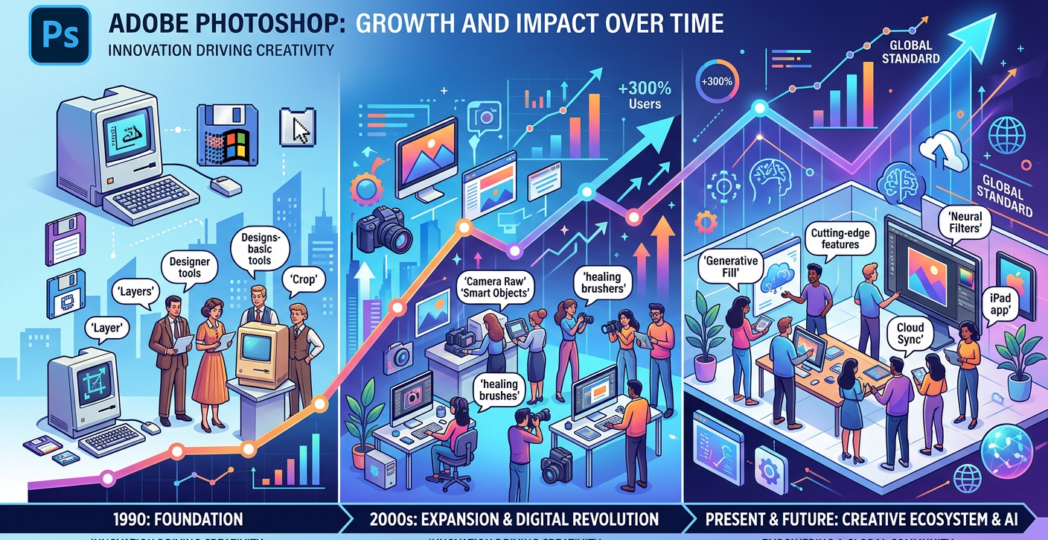
-by Adobe Photoshop has remained one of the most influential tools in digital imaging, photography, graphic design, and creative production. Over the last two years, from late 2024 through October 2026, Photoshop has undergone a significant transformation driven by generative artificial intelligence (AI), intelligent image editing, workflow automation, and deeper integration with Adobe’s creative ecosystem.
These developments are changing how professionals create visual content. Tasks that once required extensive manual retouching, compositing, and background reconstruction can now be completed more efficiently with AI-assisted tools. At the same time, Photoshop continues to offer traditional layer-based editing and precision controls, allowing creative professionals to combine automation with their own artistic judgment.
1. Generative AI and Advanced Image Editing
One of the most important developments has been the continued expansion of AI-powered features, including Generative Fill, Generative Expand, and improvements to object removal. These tools allow users to add, replace, extend, or remove elements in an image using selections and text prompts.
Generative Fill helps designers explore alternative compositions without manually constructing every element. Generative Expand can extend an image beyond its original boundaries, creating additional visual content that fits the surrounding scene. These capabilities are particularly useful for advertising layouts, social media graphics, product photography, and images that need different aspect ratios.
During 2026, Adobe also introduced additional generative models and expanded the choice of partner AI models in Photoshop. This gives creators more flexibility to choose approaches suited to different visual tasks. <Link url=”https://helpx.adobe.com/photoshop/desktop/whats-new/whats-new-in-adobe-photoshop-on-desktop.html” title=”Adobe’s official Photoshop release notes”/> document these developments.
The market impact is substantial: creative teams can explore more concepts in less time, although the quality of results still depends on the prompt, source image, model, and human refinement.
2. Harmonize and More Realistic Image Compositing
Creating convincing composites has traditionally required careful adjustment of lighting, color, shadows, and visual perspective. Photoshop’s Harmonize feature, introduced in its 2025–2026 development cycle, helps integrate inserted objects into an existing scene by adapting their appearance to the surrounding image.
For example, a marketing designer can place a product into a lifestyle photograph and use AI assistance to make the lighting and shadows appear more consistent. This can accelerate mock-up creation and concept development for advertising, e-commerce, and commercial photography.
Harmonize does not eliminate the need for professional compositing skills. Detailed projects may still require manual masking, color grading, perspective correction, and quality inspection. Its value lies in reducing repetitive adjustments while leaving creative decisions under the designer’s control.
3. Generative Upscale and Improved Image Quality
Image resolution is an important consideration for print production, digital advertising, and large-format displays. Photoshop’s Generative Upscale capability, powered by technology from Topaz Labs, helps increase image resolution while improving perceived sharpness and detail. <Link url=”https://helpx.adobe.com/photoshop/desktop/whats-new/whats-new-in-adobe-photoshop-on-desktop.html” title=”Adobe’s feature documentation”/> lists this capability among its recent innovations.
This is valuable when businesses need to reuse older photographs, prepare images for larger displays, or adapt existing creative assets for new campaigns. Instead of automatically rejecting a lower-resolution source image, teams can evaluate whether upscaling produces an acceptable result.
However, AI enhancement may synthesize details rather than recover information that was genuinely captured. For documentary, scientific, archival, and product-critical images, professionals should verify that enhanced details do not misrepresent the original subject.
4. Prompt-Based Editing and AI-Assisted Creative Workflows
A major direction in Photoshop’s recent development is the move toward natural-language editing. In August 2026, Adobe announced the AI Assisted Editor in beta, bringing prompt-driven editing and familiar creative tools into an optional workspace. Features include prompt-based image editing, background removal, Generative Fill, Generative Expand, and AI-guided markup. <Link url=”https://blog.adobe.com/en/publish/2026/08/27/new-photoshop-innovations-bring-you-more-choice-control-at-every-stage-of-your-creative-process” title=”Adobe’s announcement of Photoshop innovations”/> describes this approach.
Prompt-based editing lowers the barrier to exploring visual ideas. Users can describe a desired change instead of relying exclusively on complex manual selections. More experienced designers can use prompts as a starting point and then refine the results with Photoshop’s precision tools.
This development is reshaping creative workflows by making image editing more conversational and iterative. It also increases the importance of prompt-writing skills, visual evaluation, and the ability to recognize AI-generated errors.
5. Improved Precision, Lighting, and Design Controls
AI is not the only area of innovation. Photoshop’s recent updates have also focused on traditional editing efficiency and creative control.
The Light Adjustment Layer introduced in 2026 provides non-destructive controls for exposure, contrast, highlights, shadows, whites, and blacks within the layer-based workflow. Markup features let users visually indicate desired edits, while improvements to Dynamic Text allow text to adapt to shapes and paths more flexibly. Adobe has also expanded in-app access to Adobe Stock assets. These capabilities are outlined in its August 2026 feature announcement.
Together, these updates reduce interruptions between asset discovery, editing, and design refinement. They also reinforce Photoshop’s position as a professional editing environment rather than merely an AI image generator.
6. Impact on Photography, Advertising, and E-Commerce
Photoshop’s changing capabilities are influencing several creative industries.
Photography: Retouchers can remove distractions, adjust compositions, and enhance images more efficiently, leaving additional time for detailed finishing.
Advertising and marketing: Teams can develop campaign variations and adapt artwork for different formats without rebuilding every composition from scratch.
E-commerce: Businesses can test product presentation concepts and create alternative promotional visuals more quickly, provided the final imagery accurately represents the products.
Graphic design: Designers can combine generated content with typography, branding, illustration, and established design principles.
Media and publishing: Editors can adapt image dimensions and prepare visual assets for different layouts, while maintaining appropriate editorial standards.
The overall market effect is increased production flexibility. Smaller creative teams may be able to produce a wider range of assets, while larger organizations can improve the consistency and speed of established workflows.
7. Competition, Employment, and Professional Skills
AI-driven editing has intensified competition among professional design applications, browser-based creative platforms, and standalone image-generation tools. Photoshop’s advantage is its combination of established editing capabilities, layered workflows, and integration with Adobe’s broader creative ecosystem.
Nevertheless, AI automation creates pressure on professionals whose services rely primarily on repetitive editing tasks. Some routine work may require less time or fewer manual steps, changing how agencies and freelancers price projects and organize production.
Rather than making design expertise irrelevant, these developments increase the value of visual judgment, composition, art direction, brand knowledge, and client communication. Professionals who understand both conventional Photoshop techniques and AI-assisted workflows can adapt more effectively to changing market expectations.
8. Challenges and Future Outlook
Despite rapid progress, challenges remain. AI-generated images may contain inaccurate details, inconsistent textures, or visual artifacts. Businesses must also consider licensing, privacy, disclosure, authenticity, and the appropriate use of generated content.
Feature availability may vary according to Photoshop version, operating system, region, account eligibility, and subscription entitlements. Organizations should verify the applicable requirements before adopting new capabilities in production.
Looking ahead, Photoshop is likely to continue developing toward a hybrid creative environment in which AI models assist with image generation and editing while professionals retain detailed control over the final result. Stronger integration with cloud-based creative workflows and other Adobe applications may further streamline production.
Conclusion
Over the last two years, Adobe Photoshop has evolved through generative editing, more realistic compositing, AI-assisted upscaling, prompt-based workflows, and improved precision controls. These innovations are reducing repetitive work and expanding the range of visual concepts that individuals and organizations can explore.
The market impact extends beyond faster editing. It is changing creative production costs, professional skill requirements, and expectations for visual content delivery. The strongest results will come from combining AI efficiency with human creativity, technical expertise, and responsible quality control. Photoshop’s continued relevance will depend on how effectively it balances automation with the precision and flexibility that professional creators require.