 -by
-by In today’s competitive digital landscape, delivering the same website experience to every visitor is no longer enough. Customers expect relevant content, intuitive navigation, personalized recommendations, and interactions that reflect their interests and needs. Organizations that understand these expectations can build stronger customer relationships, improve engagement, and create more effective digital journeys.
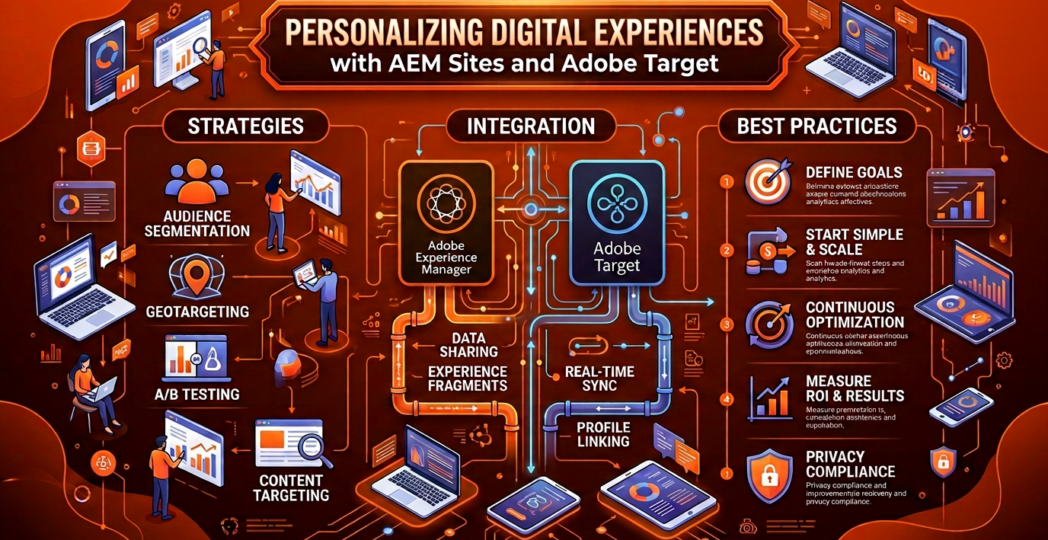
Adobe Experience Manager (AEM) Sites and Adobe Target provide complementary capabilities for delivering personalized digital experiences. AEM Sites enables organizations to create, manage, and publish digital content, while Adobe Target supports experience testing, audience targeting, and data-informed optimization. When integrated effectively, these platforms help marketing and digital teams deliver relevant content variations, experiment with different experiences, and continuously improve website performance.
The goal of personalization is not simply to display different content to different visitors. It is to provide meaningful experiences that help users accomplish their objectives while supporting measurable business outcomes.
1. Understanding AEM Sites and Adobe Target
Adobe Experience Manager Sites is an enterprise content management solution that helps teams build and manage websites and digital experiences. It provides reusable components, templates, content authoring tools, and content management capabilities that support consistent publishing across digital channels.
Adobe Target focuses on experimentation and personalization. It enables teams to define audiences, deliver targeted experiences, compare alternatives, and evaluate results using appropriate performance metrics. Depending on the implementation and available capabilities, teams can use rule-based targeting, A/B testing, experience targeting, and automated personalization approaches.
Together, the platforms connect content production with experience optimization. AEM Sites provides the content and presentation foundation, while Adobe Target helps determine which eligible experience should be presented to a particular audience or visitor context.
The integration approach depends on the AEM deployment model, supported Adobe integrations, implementation architecture, and product entitlements.
2. Why Personalized Experiences Matter
Personalization can make digital experiences more relevant by aligning content with visitors’ needs, interests, and stages in their customer journey. A first-time visitor researching a service may need educational content, while an existing customer may prefer support resources, product updates, or advanced features.
Without personalization, users may encounter generic messages that do not reflect their immediate goals. This can create unnecessary navigation, reduce engagement, and make it harder for visitors to find useful information.
AEM Sites and Adobe Target help organizations test and deliver more relevant content variations. For example, a financial services company might test educational resources against product-focused messaging for different eligible audience groups. An online retailer might experiment with category-page layouts or promotional banners to understand which experience supports product discovery more effectively.
Personalization should be based on legitimate business objectives, reliable signals, and meaningful value for users rather than excessive data collection or arbitrary content changes.
3. Preparing Content for Personalization in AEM Sites
Successful personalization begins with a well-organized content foundation. AEM Sites allows teams to create reusable components and structured page experiences that can support different content variations without requiring entirely separate websites.
Content authors can prepare alternative headlines, banners, calls to action, promotional messages, and supporting content for relevant scenarios. Reusable components and consistent templates help preserve brand standards while allowing controlled variation.
For example, a technology company might develop a standard homepage hero component with approved variations for product awareness, enterprise solutions, and customer education. These variations can then be incorporated into an appropriate targeting or experimentation workflow.
Content teams should establish naming conventions, approval processes, accessibility standards, and clear ownership for each variation. They should also ensure that alternate versions provide accurate information and maintain a consistent visual identity.
A strong content model makes personalization easier to maintain because teams can manage variations systematically rather than creating disconnected page copies.
4. Integrating AEM Sites with Adobe Target
Integration connects content delivery and experience management with targeting and testing capabilities. The precise implementation depends on the AEM architecture, supported integration options, and whether the organization uses AEM as a Cloud Service or another supported deployment.
In a typical implementation, the team configures the appropriate Adobe services and integration settings, establishes the relevant experience-delivery method, and verifies that eligible pages can participate in testing or personalization activities.
The process generally involves several steps:
-
Confirm the business objective and identify pages suitable for personalization.
-
Configure the supported AEM and Adobe Target integration.
-
Prepare content variations and establish appropriate audience definitions.
-
Implement the required experience-delivery and tracking configuration.
-
Validate page rendering, audience eligibility, analytics, and consent behavior.
-
Launch a controlled test and monitor results before expanding the experience.
Depending on the implementation, teams may use supported AEM integration features, Adobe Experience Platform Web SDK, or other approved delivery mechanisms. These approaches are not interchangeable in every architecture, so the implementation should follow the relevant Adobe documentation and technical requirements.
5. Audience Segmentation and Targeted Content
Audience segmentation helps teams organize visitors into groups for whom a particular experience may be relevant. Segments can be defined using permitted information such as contextual signals, declared preferences, authenticated customer attributes, or eligible behavioral data.
For example, an educational institution might provide prospective students with program information while directing existing learners toward course access and support resources. A software company could test introductory product messaging for new visitors and technical documentation for users exploring implementation details.
Segmentation should remain understandable, useful, and appropriately governed. Teams should avoid making sensitive or unsupported assumptions about individuals. Audience rules must also account for consent requirements, data availability, and the limitations of the selected delivery architecture.
A practical strategy starts with a small number of meaningful audience groups. Teams can expand segmentation as they gather evidence that additional distinctions improve the customer experience.
6. A/B Testing and Continuous Optimization
Personalization is most effective when organizations test their assumptions. Adobe Target can support experimentation that compares alternative experiences to determine which performs better against a defined objective.
For example, a business could compare two calls to action, different hero messages, or alternative page layouts. A test should have a clear hypothesis, such as: “A more descriptive call to action will increase qualified demo requests.”
Before launching, teams should select a primary success metric, define the audience, establish an appropriate testing period, and ensure that tracking works correctly. They should also consider secondary metrics, such as engagement quality or downstream conversion, to avoid optimizing for clicks that do not produce meaningful business value.
Results should be interpreted carefully. Small sample sizes, seasonal changes, overlapping experiments, and differences in audience composition can affect conclusions. Teams should avoid declaring a winner based on early fluctuations or treating correlation as proof of causation.
A continuous optimization cycle enables organizations to learn from results and refine experiences over time.
7. Measuring Performance and Business Impact
Personalization initiatives need clear measurement frameworks. Relevant metrics may include conversion rate, qualified lead submissions, content engagement, product discovery, task completion, or successful navigation to important resources.
The right metric depends on the page and the visitor’s intent. A support page, for instance, may be more successful when users resolve an issue quickly, even if their time on the page decreases. A product page may require a combination of engagement, conversion, and downstream quality indicators.
Teams should verify that event tracking and reporting are consistent across the relevant systems. They should also distinguish between the performance of a personalized experience and the broader effects of campaign activity, traffic changes, or other simultaneous website modifications.
Regular performance reviews help identify which experiences should be retained, revised, or retired.
8. Privacy, Governance, and Implementation Best Practices
Personalization must respect customer privacy and organizational policies. Teams should use only approved data sources, apply appropriate consent controls, and avoid exposing sensitive information through audience definitions or page content.
Access to targeting activities and experience configuration should be restricted according to team responsibilities. Content variations should undergo editorial, legal, accessibility, and brand review where appropriate. Teams should also test fallback behavior for visitors who are not eligible for targeting or whose personalization signals are unavailable.
From a technical perspective, developers should validate performance, prevent conflicting experience changes, test responsive layouts, and ensure that personalization does not compromise accessibility or search engine requirements. Clear documentation of audience rules, experiment hypotheses, metrics, and outcomes improves maintainability.
A phased rollout is often preferable: begin with one high-value page, validate the integration, measure results, and expand only after the workflow proves reliable.
Conclusion
Personalizing experiences with AEM Sites and Adobe Target enables organizations to connect content management with structured experimentation and audience-driven experience delivery. AEM Sites provides a flexible foundation for creating and managing digital content, while Adobe Target supports testing, targeting, and ongoing optimization.
The most successful programs combine relevant content, well-defined audiences, reliable integrations, meaningful measurement, and strong privacy controls. Rather than treating personalization as a one-time technical deployment, organizations should approach it as a continuous learning process shaped by customer needs and evidence.
By starting with clear objectives and refining experiences through controlled experimentation, businesses can create more useful digital journeys, strengthen customer engagement, and improve the effectiveness of their digital platforms.