 -by
-by Microsoft Identity and Access Management is a fundamental component of modern enterprise cybersecurity, enabling organizations to protect user identities, control access to applications, and safeguard sensitive business information. As companies increasingly adopt cloud computing, hybrid work environments, digital transformation, and artificial intelligence, managing identities securely has become a strategic business priority.
Microsoft provides a comprehensive identity security ecosystem through Microsoft Entra ID, Microsoft Entra ID Governance, and related Microsoft security services. These technologies help organizations authenticate users, enforce access policies, manage administrative privileges, and monitor suspicious activity across digital environments.
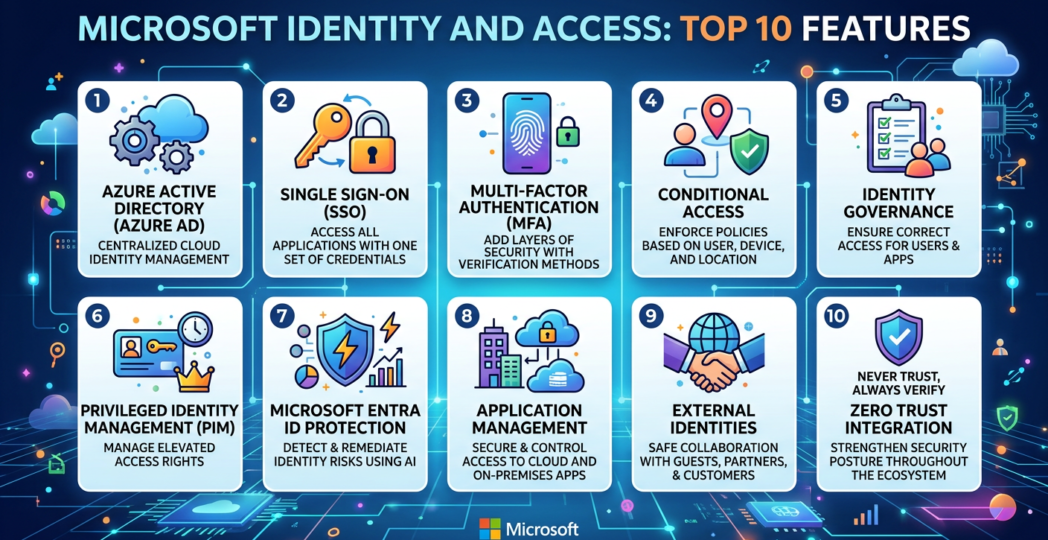
The following article explores the top 10 features of Microsoft Identity and Access Management, explaining how each capability contributes to stronger security, improved productivity, and simplified IT administration.
1. Microsoft Entra ID and Centralized Identity Management
Microsoft Entra ID, previously known as Azure Active Directory, is Microsoft’s cloud-based identity and access management service. It provides a centralized platform for managing identities and controlling access to supported applications, cloud resources, and enterprise services.
Organizations can use Microsoft Entra ID to manage employee accounts, contractors, guest users, application identities, and other supported identity types. It integrates with Microsoft 365, Azure, and numerous third-party business applications.
Centralized identity management helps IT teams maintain consistent authentication policies and reduce the complexity of managing separate credentials across different systems. In hybrid environments, organizations can also integrate supported on-premises directory services with cloud identity management.
Business benefit: Centralized identity administration improves visibility, simplifies user management, and supports consistent security controls across an organization’s digital infrastructure.
2. Single Sign-On for Simplified Application Access
Single sign-on (SSO) allows users to authenticate once and access multiple authorized applications without repeatedly entering credentials. Microsoft Entra ID supports SSO for compatible applications through standards and integration methods such as OpenID Connect, OAuth-based authorization flows, SAML, and other supported mechanisms.
For example, employees may access Microsoft 365 and other connected business applications using their organizational identity. Administrators can manage application assignments centrally and apply relevant access policies.
SSO improves productivity by reducing repetitive sign-in activities and helping users manage fewer separate passwords. It can also strengthen security by allowing organizations to centralize authentication requirements and monitor access activity.
However, SSO should always be combined with strong authentication and carefully designed access policies. A compromised primary identity may expose multiple connected applications if appropriate protections are not in place.
Business benefit: SSO creates a smoother user experience while helping IT teams centralize application access and authentication management.
3. Multifactor Authentication and Passwordless Access
Multifactor authentication (MFA) requires users to provide additional evidence of their identity beyond a password. This additional verification can help prevent unauthorized access when credentials have been stolen or exposed.
Microsoft supports multiple authentication methods, including Microsoft Authenticator, security keys, and other supported verification options. Passwordless authentication can further reduce reliance on traditional passwords through methods such as passkeys, FIDO2 security keys, and Windows Hello for Business.
Organizations can select authentication methods based on security requirements, user accessibility, device compatibility, and operational needs. Strong authentication is especially important for administrators, remote workers, and users accessing sensitive information.
IT teams should also configure secure recovery procedures and emergency access accounts to ensure that authentication failures do not prevent critical security administration.
Business benefit: MFA and passwordless authentication reduce dependence on passwords and help protect accounts against phishing, credential theft, and unauthorized sign-ins.
4. Conditional Access and Zero Trust Security
Conditional Access helps organizations determine whether access should be allowed, blocked, or subject to additional requirements based on contextual signals. Depending on available features and configuration, policies can consider user identity, application, device compliance, location signals, and sign-in risk.
For example, a business can require MFA when users access sensitive applications or restrict access from devices that fail established security requirements. Additional controls can be applied to privileged accounts and high-value business resources.
Conditional Access supports the Zero Trust model, which emphasizes verifying access explicitly, applying least privilege, and assuming that threats may exist both inside and outside traditional network boundaries.
To prevent accidental lockouts, administrators should test policies carefully, use staged deployment where appropriate, review sign-in logs, and maintain properly protected emergency access accounts.
Business benefit: Context-aware access policies help organizations respond to changing security conditions rather than relying only on usernames, passwords, or network location.
5. Identity Governance and Lifecycle Management
Identity governance ensures that users receive the appropriate permissions and retain them only while those permissions are necessary. Microsoft Entra ID Governance provides capabilities that can support identity lifecycle processes, access reviews, and controlled access requests, depending on licensing and configuration.
Lifecycle management covers important employee events such as onboarding, job changes, transfers, and departures. Automated workflows can help standardize selected tasks and reduce manual administration.
Access reviews enable managers and resource owners to confirm whether users still require access to particular applications, groups, or resources. Entitlement management can help organize access requests and assignments through defined access packages.
These capabilities are particularly valuable in large enterprises with contractors, temporary employees, external partners, and strict compliance requirements.
Business benefit: Identity governance reduces unnecessary access, improves accountability, and helps organizations maintain more accurate identity records throughout the user lifecycle.
6. Privileged Identity Management
Privileged accounts have elevated permissions that may allow users to change security settings, administer infrastructure, or access confidential information. If attackers compromise these accounts, the consequences can be significantly greater than those associated with ordinary user accounts.
Microsoft Entra Privileged Identity Management (PIM) helps organizations control and monitor eligible privileged role assignments. Depending on the role and configuration, administrators can require users to activate privileges only when necessary, provide justification, complete additional authentication, or obtain approval.
Time-limited privilege activation can reduce the number of permanently active administrative assignments. Organizations can also review privileged roles and monitor administrative activity.
PIM should be supported by strong authentication, separation of duties, emergency access procedures, and regular security reviews.
Business benefit: Privileged Identity Management helps minimize excessive administrative access and reduces the potential impact of compromised administrator accounts.
7. External Identity and Business-to-Business Collaboration
Organizations frequently collaborate with suppliers, customers, consultants, and partner businesses. Providing these external users with appropriate access can be challenging when each organization operates a different identity environment.
Microsoft Entra External ID supports external identity scenarios, including business-to-business collaboration and, for suitable configurations, customer-facing identity experiences. Organizations can invite external users to collaborate on approved resources while maintaining control over permissions and access requirements.
Administrators can establish restrictions for external collaboration, configure authentication requirements, and review guest-user access. Access should be granted only to the applications and resources necessary for each collaboration.
Regular reviews are important because external relationships change, contracts expire, and project requirements evolve.
Business benefit: External identity capabilities support secure collaboration without requiring organizations to manage every partner as a traditional internal employee.
8. Application Identity and Workload Authentication
Modern business systems depend on applications, APIs, automated processes, and cloud workloads that must authenticate securely. These non-human identities require careful management because poorly protected credentials can create significant security vulnerabilities.
Microsoft Entra supports application registrations, service principals, and managed identities for supported scenarios. Managed identities can allow eligible Azure resources to authenticate to compatible services without developers embedding long-lived credentials directly into application code.
Application permissions should be carefully reviewed and limited to the resources and operations genuinely required. Administrators should also examine consent grants, remove unused registrations, and maintain appropriate credential rotation procedures where credentials are necessary.
As organizations adopt automation and AI-powered applications, governing application identities and delegated permissions becomes increasingly important.
Business benefit: Secure workload identity management reduces credential-handling risks and helps protect integrations, automated processes, and cloud applications.
9. Identity Protection and Risk-Based Security
Identity security requires organizations to detect suspicious behavior, not simply enforce authentication rules. Microsoft Entra provides identity-related risk detection and investigation capabilities, subject to the relevant service configuration and licensing.
Risk signals may help identify suspicious sign-ins, potentially compromised accounts, or unusual authentication activity. Organizations can use supported risk-based policies to require additional verification, restrict access, or initiate remediation when defined conditions are met.
Security teams can investigate sign-in logs, audit events, and identity risk information to understand potential incidents. Integration with Microsoft Defender and Microsoft Sentinel can provide broader visibility by correlating identity events with other security data.
Detection capabilities should be supported by a documented response process that covers account containment, session revocation, credential recovery, permission review, and investigation.
Business benefit: Risk-based identity protection helps security teams prioritize suspicious activity and respond more effectively to potential account compromise.
10. Reporting, Auditing, and Compliance Support
Organizations need clear records of authentication events, access changes, administrative actions, and identity governance decisions. Microsoft Entra provides sign-in logs, audit logs, and reporting capabilities that support security investigations and operational monitoring.
Administrators can use available reports to examine authentication failures, identify unexpected configuration changes, investigate access issues, and review relevant administrative activity. Depending on the organization’s environment, logs can also be integrated with Microsoft Sentinel or other supported monitoring platforms.
These records can help organizations demonstrate that access controls are monitored and reviewed. However, the availability and retention of logs depend on licensing, configuration, export settings, and applicable service limits. Compliance also requires appropriate policies, documented procedures, and organizational accountability; technology alone does not guarantee compliance.
Business benefit: Identity reporting improves operational visibility, supports investigations, and provides useful evidence for internal audits and compliance activities.
Conclusion
Microsoft Identity and Access Management provides a broad collection of capabilities designed to protect identities, applications, administrative roles, and business resources. Its ten important features include centralized identity management, single sign-on, multifactor authentication, Conditional Access, identity governance, privileged identity management, external collaboration, workload identity, risk-based protection, and auditing.
When implemented together through a well-planned security strategy, these capabilities can reduce identity-related risks while improving user productivity and simplifying IT administration. Organizations should prioritize strong authentication, least-privilege access, reliable onboarding and offboarding processes, regular access reviews, and continuous monitoring.
As cloud adoption, automation, and artificial intelligence continue to expand, identity management will become even more important. Businesses that invest in a mature Microsoft identity security strategy will be better positioned to protect digital assets, support secure collaboration, and adapt to changing cybersecurity challenges.