 -by
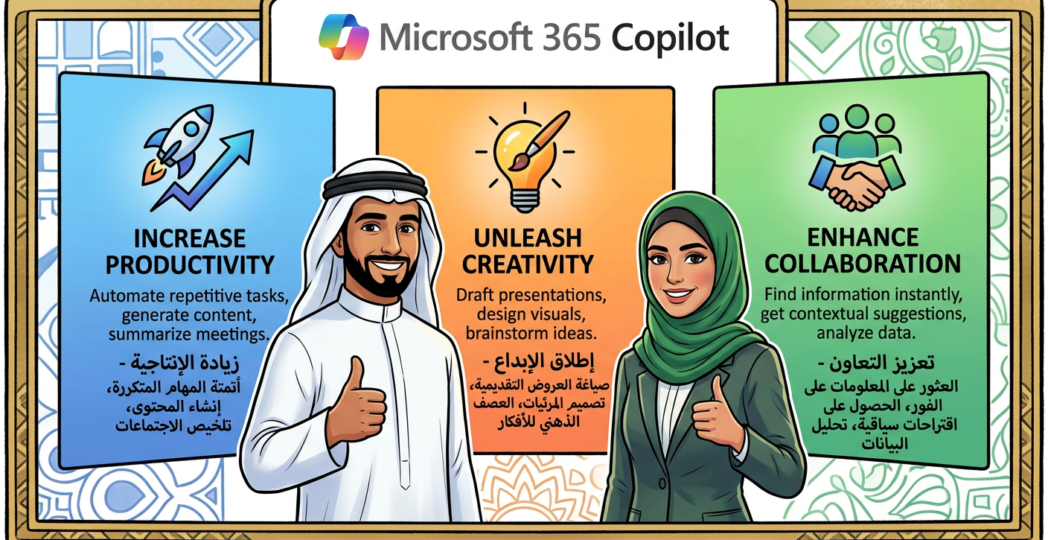
-by Artificial intelligence is transforming the modern workplace by changing how employees create content, analyze information, communicate with colleagues, and manage everyday tasks. Microsoft 365 Copilot is an AI-powered productivity assistant designed to help users work more efficiently within familiar Microsoft applications, including Word, Excel, PowerPoint, Outlook, and Teams. By combining large language models with relevant organizational information and Microsoft 365 applications, Copilot helps employees turn instructions and natural-language questions into useful work outputs.
For businesses seeking to improve productivity, reduce repetitive tasks, and accelerate decision-making, Microsoft 365 Copilot offers opportunities to integrate AI into existing workflows. Rather than requiring employees to switch constantly between separate tools, it brings AI assistance into applications they already use.
The benefits of Microsoft 365 Copilot extend beyond faster content creation. With appropriate deployment, governance, and employee training, organizations can improve collaboration, support data analysis, enhance communication, and establish more effective working practices.
1. Increased Productivity and Time Savings
One of the most significant benefits of Microsoft 365 Copilot is its ability to reduce the time employees spend on repetitive and time-consuming tasks. Professionals frequently prepare documents, summarize lengthy communications, organize information, and create presentations. These activities are important but can consume time that could otherwise be devoted to strategic work.
Copilot helps users begin tasks more quickly by generating drafts, suggesting structures, summarizing information, and responding to natural-language instructions. For example, an employee can request an initial project outline or ask for a summary of a lengthy document before preparing a detailed response.
By reducing the effort required to complete routine work, Copilot can help employees focus on analysis, planning, problem-solving, and customer engagement.
Actual productivity gains depend on the task, the quality of user instructions, and the organization’s implementation approach. Businesses should evaluate results through practical measures such as task completion time, output quality, and employee feedback.
2. Smarter Document Creation in Microsoft Word
Microsoft Word is widely used for creating reports, proposals, policies, business plans, and other professional documents. Copilot can assist with drafting and refining these materials using prompts and relevant information available to the user.
Employees can request an initial draft, restructure existing content, summarize long passages, or adjust writing for a particular audience. For instance, a project manager can develop a first draft of a project proposal and then refine it to include objectives, deliverables, risks, and implementation considerations.
Copilot can also help users transform rough notes into more organized content. This is especially useful when preparing internal communications, meeting summaries, and business documentation.
However, AI-generated content should be reviewed before publication. Users need to verify factual claims, confirm numerical information, check tone, and ensure that confidential or legally significant statements are accurate.
The primary advantage is that Copilot provides a starting point that employees can refine rather than requiring them to build every document from scratch.
3. Improved Data Analysis in Microsoft Excel
Microsoft Excel supports financial reporting, budgeting, forecasting, operational tracking, and business analysis. Copilot can assist eligible users with understanding data, exploring trends, generating formulas, and developing analytical summaries, depending on the available features and workbook configuration.
For example, a business analyst may ask Copilot to identify patterns in a sales table, explain a calculation, or suggest ways to compare performance across regions. This can help users explore information without manually performing every preliminary analysis.
Copilot may also help users understand unfamiliar formulas and identify potential analytical approaches. Employees with limited technical experience can use natural-language questions to begin investigating datasets.
Nevertheless, AI-generated calculations and interpretations must be validated. Results depend on data quality, workbook structure, feature availability, and the clarity of the request. Analysts should verify formulas, investigate outliers, and confirm that conclusions are supported by the underlying data.
When used responsibly, Copilot can make Excel analysis more approachable and help teams move more quickly from raw information to meaningful questions.
4. Faster Presentation Development in PowerPoint
Creating effective presentations often requires considerable time spent organizing information, developing slide structures, and adapting content for different audiences. Microsoft 365 Copilot can assist with presentation creation and refinement in supported PowerPoint experiences.
Users may be able to generate an initial presentation from a prompt or eligible source document, summarize key points, and refine slide content for executive briefings, training sessions, sales presentations, or project updates.
For example, a consultant can use an existing project report as the starting point for a presentation that communicates major findings, recommendations, risks, and next steps.
Copilot can help establish a logical flow, but human review remains essential. Presenters should verify the accuracy of content, ensure that charts and supporting evidence are appropriate, and maintain the organization’s visual identity.
By reducing the effort required to create the first draft, Copilot allows professionals to devote more attention to storytelling, audience needs, and the quality of their recommendations.
5. Better Email Management in Outlook
Email remains a major part of business communication, but managing large volumes of messages can create delays and distract employees from important work. Copilot in Outlook can assist with summarizing email threads, drafting replies, and adjusting the tone or length of messages in supported experiences.
An employee returning from leave, for example, may use a summary to understand the main discussion points in a long email conversation. A manager can draft a response to a customer, review its clarity, and refine it before sending.
These capabilities can help users communicate more consistently and spend less time reconstructing the history of complex conversations.
AI-generated messages should always be reviewed for accuracy, appropriate tone, and unintended commitments. Employees should also follow organizational policies when handling personal, financial, or confidential information.
With sensible review practices, Copilot can make email management more efficient while preserving human responsibility for important business communications.
6. More Effective Meetings and Collaboration in Microsoft Teams
Meetings are essential for collaboration, but employees can struggle to capture decisions, track action items, and understand discussions they could not attend. Microsoft 365 Copilot in Teams can assist with meeting summaries, key discussion points, and follow-up tasks in supported configurations.
For example, a project team can use an available meeting recap to review decisions, identify outstanding questions, and organize next steps. Participants can spend more time contributing to discussions instead of attempting to document every detail manually.
Copilot can also help users understand information from supported conversations and meeting contexts, subject to permissions and feature availability.
The quality of meeting assistance depends on factors such as transcription availability, language support, meeting settings, and the information accessible to the service. Employees should verify important decisions and action items before treating them as final records.
These capabilities can improve continuity between meetings and help distributed teams coordinate their work more effectively.
7. Enhanced Knowledge Discovery Across Microsoft 365
Organizations store valuable information across documents, emails, meetings, chats, and other business applications. Finding the correct information can be difficult when employees must search across multiple locations.
Microsoft 365 Copilot can help users ask natural-language questions and discover relevant information from supported organizational sources they are authorized to access. Instead of manually searching through many documents, employees may be able to obtain a concise summary of relevant information and use it as a starting point for further investigation.
For example, a new team member may need to understand the background of a project, locate relevant decisions, or review information about a business process.
This benefit depends heavily on the quality of organizational information and the configuration of permissions. Copilot does not automatically make every document accessible to every employee; access is governed by the underlying Microsoft 365 security and permission model. However, existing oversharing can become easier to discover, making permission reviews an important deployment priority.
8. Support for Creativity and Problem-Solving
Copilot can help employees explore ideas, develop alternatives, and structure complex tasks. Marketing teams can brainstorm campaign concepts, trainers can outline learning materials, and project managers can identify potential risks or develop preliminary action plans.
It can also help users approach unfamiliar topics by generating explanations, suggested questions, or alternative ways to organize information. This makes it useful during early-stage planning, when employees need to move from a broad objective to a more structured proposal.
AI suggestions should be treated as inputs for human judgment rather than automatically accepted recommendations. Users should assess feasibility, validate assumptions, and consider relevant business context.
When employees combine their professional expertise with AI-generated ideas, Copilot can support more flexible problem-solving and reduce the time needed to develop an initial set of options.
9. Improved Organizational Consistency and Workflow Efficiency
Businesses often need consistent communication, documentation, and reporting across departments. Copilot can help employees work from common templates, follow established document structures, and produce more standardized first drafts.
For example, a human resources team can develop a draft onboarding guide, while a project office can prepare structured status updates using an established format. Teams can then review these drafts against company policies and approved procedures.
Organizations can further support consistency through employee training, prompt guidelines, approved templates, and clear review requirements.
Copilot does not automatically guarantee compliance or uniform quality. Its output can vary based on instructions and available information. Human approval processes remain important for legal documents, financial reporting, regulated communications, and other high-impact work.
Used within well-designed workflows, Copilot can help reduce avoidable variation and support more repeatable business processes.
10. Business Value, Security, and Responsible AI Adoption
Microsoft 365 Copilot can create business value by helping employees work more efficiently, reducing the effort required for routine tasks, and making organizational information easier to use. However, successful adoption requires more than purchasing licenses.
Organizations should evaluate licensing and feature availability, assess existing Microsoft 365 permissions, classify sensitive information, and establish appropriate data protection controls. Administrators should review access policies and sharing practices before deployment to reduce the risk of exposing information through existing oversharing.
Employee training is equally important. Users should learn how to write effective prompts, verify AI-generated information, protect confidential data, and recognize when professional judgment is necessary.
Businesses should measure outcomes through practical indicators such as time saved, user adoption, quality improvements, and workflow completion rates. Regular assessments help organizations identify useful scenarios, address risks, and refine their implementation strategy.
Conclusion
Microsoft 365 Copilot offers organizations an opportunity to integrate AI assistance into everyday business activities. Its benefits include increased productivity, faster document creation, improved spreadsheet analysis, more efficient presentations, easier email management, better meeting collaboration, enhanced knowledge discovery, creative support, consistent workflows, and broader opportunities for digital transformation.
The greatest value emerges when Copilot is introduced with clear business objectives, appropriate security controls, effective employee training, and reliable human review. AI can accelerate many tasks, but it should complement rather than replace professional expertise and accountability.
As organizations continue to adopt AI-powered workplace tools, Microsoft 365 Copilot can serve as an important component of a modern productivity strategy, helping employees spend less time on repetitive work and more time creating meaningful business outcomes.