
 -by
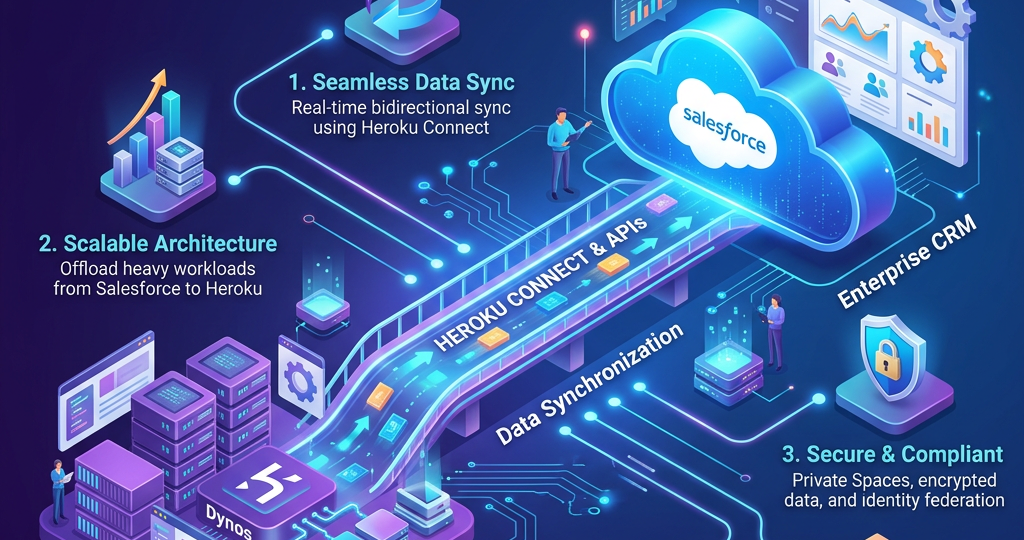
Modern businesses need flexible, scalable, and secure applications that connect customer relationship management (CRM) systems with external services and business processes. Heroku and Salesforce integration enables organizations to extend Salesforce capabilities by building and hosting custom applications, APIs, and background services on Heroku while using Salesforce as a central platform for customer and business data.
Heroku is a cloud application platform that supports the development, deployment, and management of applications using languages such as Node.js, Python, Java, Ruby, and other supported technologies. Salesforce provides CRM capabilities, business data, automation, and APIs for accessing customer records and business processes.
By integrating these platforms, organizations can build customer portals, data-processing services, third-party integrations, mobile application backends, and customized business solutions. Successful integration requires careful planning, secure authentication, API design, data synchronization, error handling, and continuous monitoring.
1. Understanding Heroku and Salesforce Integration
Heroku and Salesforce serve complementary purposes. Salesforce manages CRM data, including accounts, contacts, leads, opportunities, and cases. Heroku provides an environment for applications that require custom business logic, external integrations, specialized processing, or independent deployment.
For example, an organization may develop a customer self-service portal on Heroku. Customers can use the portal to submit requests, review relevant information, or update permitted details. The Heroku application communicates with Salesforce APIs to retrieve or update authorized records.
Common integration scenarios include:
- Developing custom web and mobile applications connected to Salesforce.
- Connecting Salesforce with external databases, payment systems, ERP platforms, and third-party APIs.
- Processing large workloads outside synchronous Salesforce transactions.
- Building customer portals and partner applications.
- Automating data exchange and business workflows.
- Implementing custom APIs and event-driven applications.
The integration method depends on business requirements, data volume, security needs, and whether communication must happen immediately or asynchronously.
2. Important Steps for Heroku and Salesforce Integration
Step 1: Define the Integration Requirements
Begin by identifying the business problem and expected outcomes. Determine which Salesforce objects need to be accessed, whether the application must create or update records, and how frequently data must move between systems.
For example, a customer service application might retrieve Account and Contact details, create Cases, and send status updates to customers. Document data ownership, access permissions, expected transaction volumes, response times, and error-handling requirements before choosing an integration architecture.
Step 2: Set Up the Heroku Application
Create a Heroku application and select an appropriate programming language and framework, such as Node.js, Python, or Java. Configure the development environment, connect the source-code repository, and establish separate development, testing, and production environments.
Store configuration values, API endpoints, and credentials securely using environment configuration rather than hardcoding them into source code. Deploy a basic application and confirm that it starts successfully before adding Salesforce connectivity.
Step 3: Configure Salesforce Access and Authentication
Create or configure the required Salesforce application and authentication settings. Establish a dedicated integration user where appropriate, grant the minimum necessary permissions, and select a supported OAuth authentication flow that matches the application’s requirements.
The application must obtain and manage authorization tokens securely before calling Salesforce APIs. Avoid storing passwords, access tokens, or client secrets directly in source code or exposing them in logs. Test authentication against a Salesforce sandbox before connecting to production.
Step 4: Choose the Integration Method
Select the method that best fits the use case. Salesforce and Heroku support several integration approaches, each with different advantages.
Integration method | Best suited for |
|---|---|
Salesforce REST API | Custom applications that need direct access to Salesforce records and services |
Heroku Connect | Synchronizing Salesforce objects with Heroku Postgres |
Salesforce Platform Events | Event-driven communication and asynchronous processing |
Heroku AppLink | Exposing Heroku application actions for use in Salesforce Flow, Apex, and supported platform experiences |
Salesforce Connect / Heroku External Objects | Accessing external data from Salesforce without copying all the data into Salesforce |
For example, choose Heroku Connect when an application needs SQL-based access to synchronized CRM data. Choose the REST API when the application requires direct, custom interactions with Salesforce.
Step 5: Connect and Exchange Data
For a REST API integration, configure the application to authenticate, retrieve authorized Salesforce records, and create or update records using supported API endpoints. SOQL can be used to query Salesforce data, subject to permissions and API limits.
For a Heroku Connect integration, provision Heroku Postgres, authorize the Salesforce organization, and configure mappings between Salesforce objects and database tables. Select the required fields and read-only or read-write behavior according to the application’s needs. Validate that updates synchronize as expected in both directions when bidirectional synchronization is enabled.
Step 6: Implement Automation and Event Handling
Many integrations benefit from asynchronous processing. Salesforce Platform Events and Change Data Capture can support event-driven designs in which applications react to business changes rather than repeatedly polling for updates.
Use background jobs for longer-running tasks, and design consumers to handle duplicate messages safely. For instance, when a Salesforce Case is created, an event can trigger a Heroku service to perform additional processing and return a result through an approved integration path.
Step 7: Test, Deploy, and Monitor
Test the integration using realistic but non-sensitive sample data. Verify successful record creation, updates, retrieval, permissions, synchronization delays, and failure scenarios. Include tests for expired tokens, API limits, invalid data, network interruptions, and duplicate requests.
Deploy through a controlled release process and monitor application logs, API errors, database performance, and synchronization status. Maintain clear rollback procedures and alerts for recurring failures.
3. Security and Performance Best Practices
A production-ready integration should follow these principles:
- Least-privilege access: Grant only the object, field, and operation permissions required.
- Secure credentials: Protect secrets and tokens, rotate credentials when appropriate, and restrict administrative access.
- API-limit management: Monitor Salesforce API consumption, avoid unnecessary queries, and use suitable bulk-processing options for larger workloads.
- Reliable error handling: Use timeouts, controlled retries, exponential backoff, and dead-letter or failure-handling mechanisms where appropriate.
- Data quality: Validate incoming data, handle missing fields, and define rules for duplicate records and conflicting updates.
- Observability: Use structured logs, useful error messages, monitoring, and alerts without recording sensitive information.
- Environment separation: Keep development, sandbox, staging, and production credentials and configurations separate.
- Regular reviews: Reassess access permissions, dependencies, API versions, and platform configuration as the application evolves.
These practices improve security, reliability, and maintainability while reducing integration failures.
4. Common Challenges and Solutions
Common challenges include authentication failures, Salesforce API limits, mismatched field types, delayed synchronization, and duplicate records. Authentication issues should be investigated by checking authorization settings, token validity, and permissions. API-limit issues can often be reduced through batching, efficient queries, and asynchronous processing.
Synchronization problems require reviewing Heroku Connect mappings, connection status, and error logs. Data conflicts should be addressed through explicit ownership rules—for example, deciding whether Salesforce or the Heroku application is authoritative for each field.
Conclusion
Heroku and Salesforce integration enables businesses to extend CRM capabilities with custom applications, flexible processing, external services, and synchronized data. The key to success is selecting the right integration method, configuring secure authentication, implementing reliable data exchange, and establishing thorough testing and monitoring.
- Whether using REST APIs, Heroku Connect, Platform Events, or Heroku AppLink, organizations should align the architecture with their business objectives and operational requirements. With sound planning and consistent best practices, Heroku and Salesforce can work together to deliver scalable, secure, and maintainable business solutions.